When the shared spreadsheet stops working: the problem shows up with the third rep
Three reps, one shared spreadsheet and a supervisor who opens it on Monday at six in the morning. For months that works. The day it stops working there is no warning: a customer's…
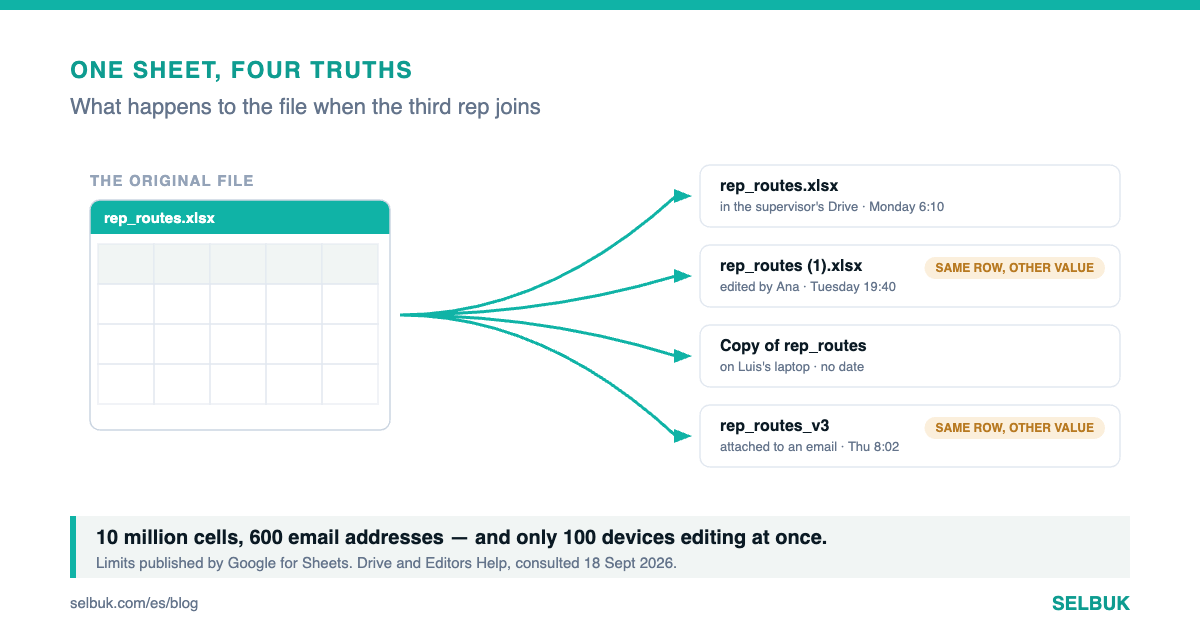
Three reps, one shared spreadsheet and a supervisor who opens it on Monday at six in the morning. For months that works. The day it stops working there is no warning: a customer's order simply shows up twice, with different quantities, and nobody knows which of the two is the real one.
This article is not about spreadsheets being bad. It is about finding the point where one stops being the right tool, which almost always arrives sooner than it looks. With figures published by Google and by Microsoft, consulted on 18 September 2026.
Where the spreadsheet wins, and it really does
Let us start with the honest part. A shared spreadsheet has no learning curve: anyone who has worked in an office knows how to use one. It changes shape in ten seconds. If you want a new column tomorrow, you create it yourself, without asking anyone or waiting on a vendor.
And it is no toy. Google publishes that a sheet holds up to ten million cells or 18,278 columns, and that a single file can be shared with up to 600 email addresses. No small sales force comes anywhere near those ceilings: the problem is never the size of the file.
Price is on its side too. Google Workspace Business Starter costs 7 dollars per user per month on an annual commitment, and Microsoft 365 Business Basic the same: 7.00 dollars per user per month paid yearly. If you already pay for company email, the spreadsheet costs you nothing extra.
What breaks is not the file: it is the turn-taking
With one rep, the sheet is a notebook. With two, it is a notebook with two owners. With three something else starts: the odds of two people touching the same row on the same day stop being rare and become weekly. And a spreadsheet has no notion of whose turn it is.
Google documents that a Sheets file can only be edited from a maximum of one hundred open tabs or devices at a time. A hundred sounds like plenty, and for a sales force it is.
Which is why it is worth understanding that the limit that will hurt you is not that one. It is coordination: who wins when two people write at once. That one is on no help page, because it is not a number — it is a working rule the spreadsheet does not have.
The third rep and the copy
Here is what happens on the street. The rep walks in where there is no signal, the sheet will not open, and to avoid losing the visit he writes the order in the phone's notes app. At night he types it into the sheet. If somebody touched that row meanwhile, one of the two edits vanishes quietly.
The next step is worse and nearly inevitable: somebody downloads a copy to work in peace. From then on two truths are circulating under the same file name, and the supervisor is looking at the wrong one. Nobody decided this would happen; it happened because the tool does not prevent it.
The questions that separate one from the other
No need to argue this in the abstract. There are five operational questions, and each answers itself the moment you try to answer it with the sheet in front of you.
| The question | In a shared spreadsheet | In a field CRM |
|---|---|---|
| Who changed this quantity, and when? | It is in version history, if you know how to dig | It is a field on the document, with its timestamp |
| Can this rep see the other one's accounts? | If he can edit the file, he sees all of it | It is set per user and per territory |
| Was the order taken at the customer or at the rep's kitchen table? | There is no way to tell | Capture time and place stay on the record |
| What if two of them sell the same stock? | Both rows save without a word | The system catches it on sync |
| How long does month-end take to close? | However long reconciling the copies takes | The documents are already closed |
None of the five is a luxury feature: they are questions a supervisor asks every week. The difference is not in what each tool can do, but in whether the answer exists without somebody rebuilding it by hand.
Permissions are the real breaking point
This is the one nobody sees coming. In a spreadsheet, whoever can write can read everything: the other reps' prices, the discounts granted, the whole customer list. There is no way to grant write access to one row and not to the one beside it.
While the team is two people you trust, it does not matter. When the third one joins, or when one of them leaves for a competitor, it stops not mattering all at once. And it is not a problem you fix with more discipline or a better template: the tool has no such concept.
The useful question is not "is a spreadsheet enough for me?". It is "how many hours a month does somebody spend reconciling versions, and which questions about my operation can I not answer without picking up the phone?".
What each one charges today
| Tool | Published price | Source, consulted 18 Sept 2026 |
|---|---|---|
| Google Workspace Business Starter | USD 7 per user/month, annual commitment | workspace.google.com/pricing |
| Google Workspace Business Standard | USD 14 per user/month, annual commitment | Google, same page |
| Microsoft 365 Business Basic | USD 7.00 per user/month, paid yearly | microsoft.com, plan comparison |
| SELBUK | Quote tailored to your business | Request a quote |
The sum has to be done in full. The sheet looks free because email was already paid for, but the Saturday somebody spends reconciling copies rarely gets added in. And the other way around: if your team is two and the sheet answers your five questions, switching gives you nothing back.
What to test on Monday, without buying anything
- Open your sheet's version history and find out who changed one specific quantity three weeks ago. Time yourself.
- Ask two reps to edit the same row at the same time and watch what ends up saved.
- Search each person's drive for how many copies of the file exist, and from what date.
- Try to grant write access to one territory and not to the others.
- Count the hours of the last month-end that went into reconciling, not into deciding.
If all five come out fine, keep the sheet and save yourself the change. If three come out badly, you now know what staying the same costs you per month, and that figure is the only one that matters in the comparison.
The short version
It is not one or the other. A spreadsheet is unbeatable for exploring, for a one-off calculation and for a team of two. What it cannot hold is turn-taking, permissions and capture times, and that is exactly what shows up when the third rep joins.
The breaking point is not the size of the file. It is the first time two people on your team answer the same question differently, and neither of them is lying.