Billing software for distributors: print the invoice on the visit with a thermal printer from your phone
In distribution, the sale closes at the customer's counter, not at the office. That is why billing software for distributors is judged at the moment of the visit: when the store…
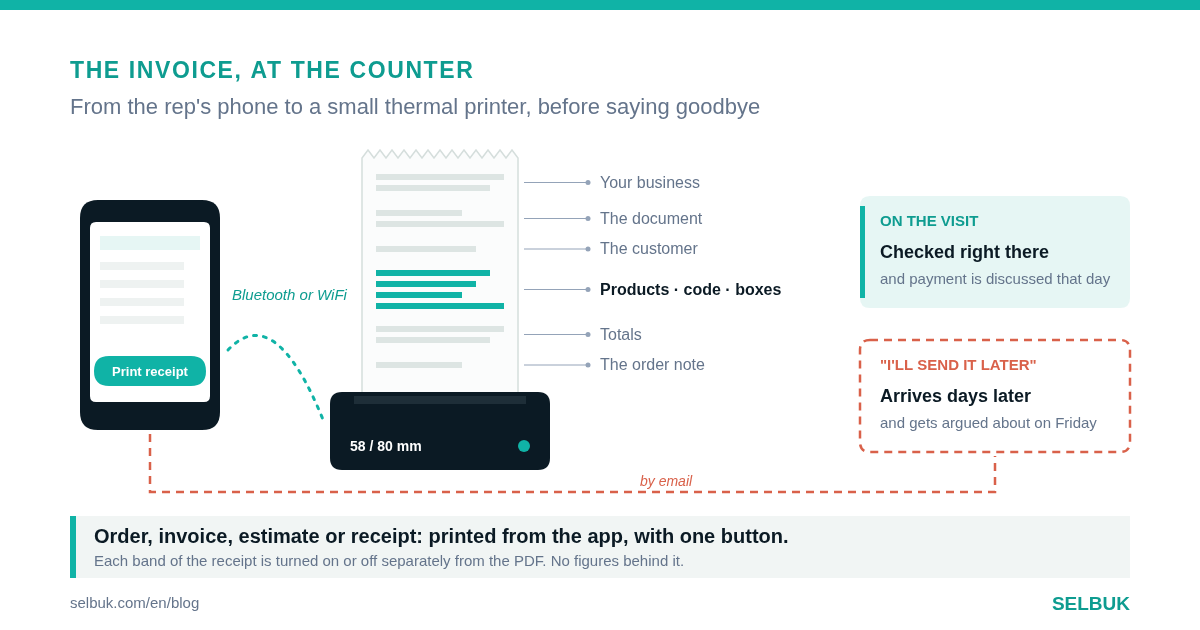
In distribution, the sale closes at the customer's counter, not at the office. That is why billing software for distributors is judged at the moment of the visit: when the store owner asks "and my invoice?" and the rep has to answer something better than "I'll email it to you later".
This article is about one specific piece that often gets left for later: printing the invoice, the order or the receipt right there, on a small thermal printer connected to the rep's phone. What the distributor gains from it, what needs to be set up, and what to ask any software provider before choosing.
Why paper in hand still sells
A route customer does not live in their inbox. Often the person who receives the order is not the one who pays, and the one who pays checks the paperwork on Friday. If at that moment there is no document with the distributor's name on it, the order only exists in someone's memory.
A printed receipt does three things at once. It closes the conversation: what was ordered is written down and both sides saw it. It avoids next week's argument about quantities or prices. And it leaves your brand in the customer's drawer, next to the suppliers who do leave something behind.
It also shortens collection. When the invoice arrives days later, the customer puts it in the queue. When they hold it while the rep is still there, the payment conversation happens on the same visit, and the receipt comes out on the same paper.
How it works in SELBUK
In the SELBUK app, the printer is chosen in Settings ▸ Printers. Bluetooth thermal printers work (on Android the ones you already paired on the phone show up; on iPhone nearby ones are scanned), as do WiFi or Ethernet printers on the local network or added by IP, and the system printers the phone already knows.
You choose the paper width, 58 or 80 mm depending on the roll, and tap "Test print". Then, to print, you open the order, invoice, estimate or receipt and tap "Print receipt". If no printer is selected, the app warns you before the rep is left looking bad in front of the customer.
The web does not do this: from the browser you print the PDF. The thermal printer belongs to the phone, which is where the rep is when they need it.
What you set up, and what it does for the rep
| The setting | Where it is | What it does on the visit |
|---|---|---|
| Paper width (58 or 80 mm) | Selected printer | The receipt does not come out cut off or with overlapping columns. |
| Ticket fields | Settings ▸ Printers | Turn the business, document, customer, totals and closing fields on or off, one by one. |
| Print the product code | Account switch | The SKU or barcode gets its own column; the customer checks the goods against the paper. |
| Boxes column | Account switch | The 80 mm receipt says how many units each box holds, with no math by hand. |
| Document note | On each order or invoice | It prints at the end of the receipt: the delivery promise or payment agreement is in writing. |
Ticket fields are set up separately from the PDF. That way the thermal paper can be short and practical, and the PDF you email still carries all the detail with your brand.
What usually goes wrong, and how to avoid it
In the first week, almost every problem is the printer, not the software. Making sure it is on, nearby and with Bluetooth enabled solves most of them. That is why the test print happens before going out on the route, not in front of the first customer of the day.
The other classic is strange characters: letters that come out as Chinese symbols. It happens with printers that ship with that mode turned on. Recent versions of the app turn it off when connecting, so the answer is to update the app before blaming the paper roll.
An invoice that arrives by email on Tuesday gets argued about on Friday. One printed at the counter gets checked right then.
What to ask any billing software before choosing
You do not need to buy anything to know whether a platform solves this. Just ask for a demo with a real thermal printer on the table and ask these questions, whoever the provider is.
| The question | The answer that works | The answer that will cost you |
|---|---|---|
| Does it print from the rep's app? | Yes, from the open document, with one button. | "You download the PDF and print it from another app." |
| Which printers does it accept? | Bluetooth and network, on Android and iPhone. | One specific model you have to buy from them. |
| Which documents does it print? | Order, invoice, estimate and receipt. | Only the invoice, and the payment on another paper. |
| Can I choose what shows on the receipt? | Field by field, separately from the PDF. | One fixed format for every customer. |
| Do the code and boxes show? | Yes, with a switch. | Only the product name. |
The third column is not an exaggeration: it is what you hear most when printing was designed for the office and later someone tried to take it out on the street. The difference shows on the first route.
What to try on Monday
- Ask a rep how many customers asked about their invoice last week.
- Look at how many route invoices were sent more than a day after the order.
- Check how many quantity differences were argued about after delivery.
- Ask what the customer keeps today when the rep leaves: nothing, a handwritten note or a paper with your brand.
- Try a 58 mm thermal printer with a single rep for one week and compare.
What to leave set up
One printer per rep, tested before heading out. The paper width set correctly. The ticket fields chosen once, thinking about what the customer checks. Code and boxes turned on if your catalog needs them. And the habit of printing before saying goodbye, not after getting back to the office.
With that, the invoice stops being paperwork that arrives late. It becomes the last sentence of the visit, and the one the customer keeps in the drawer until you come back.